
Mileage tracker
Mileage tracker with an automatic drive log
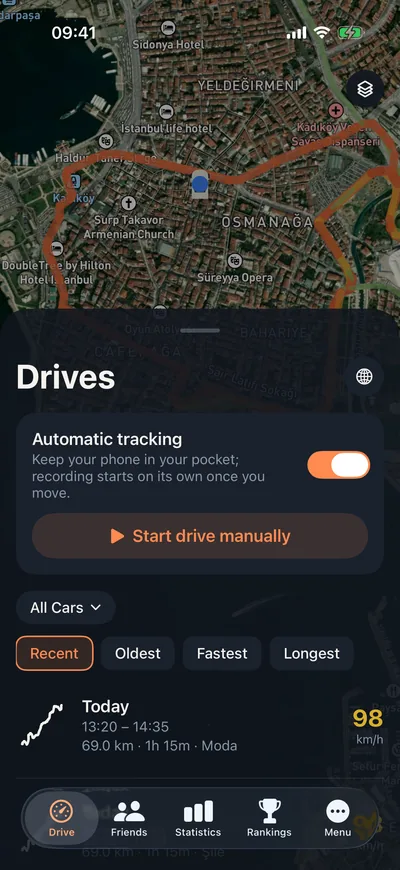
Leave your phone in your pocket. Odometer notices when you are in a car and records every drive on its own, so you can see how far you drove today, this week and this month at a glance.
Don't try to remember your mileage. Record it.
The odometer on your dashboard only tells you the total. It won't tell you how far you drove this month, what your commute adds up to each week, or which way you came home last weekend.
Odometer keeps every drive as its own record: where you went, how long it took, your average and top speed. As the records add up, your daily, weekly and monthly totals, your personal records and your driving style come into view.
How does it work?
- 01
Turn on automatic tracking
Allow location and motion access on first launch. With those two, Odometer can tell when you are in a car.
- 02
Drive as usual
Recording starts over GPS when the car moves. A short stop won't split your drive in two; it merges into the previous one.
- 03
Check your summary
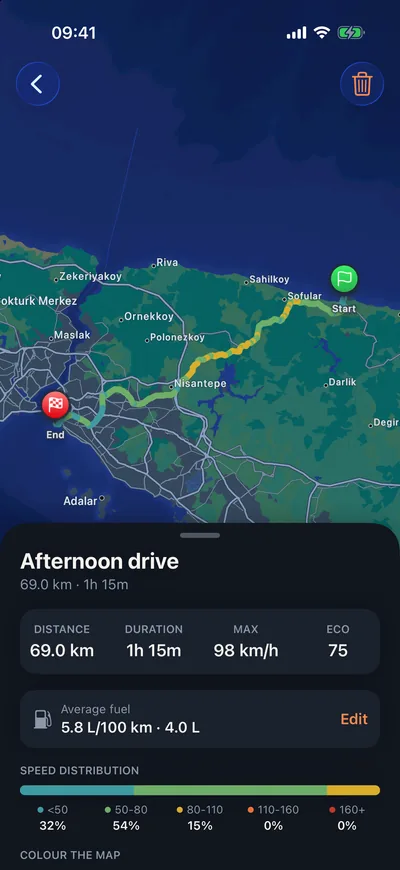
The drive ends when you park and appears in your list with its start and end neighbourhood, route map and speed chart.
What gets recorded on every drive?
Route and places
The route on a map and where you went from and to. Neighbourhood names are filled in once the drive ends.
Distance and time
Total distance, total time, and time spent moving and stopped, separately.
Speed
Average and top speed, a speed chart over time and a breakdown by speed band.
Eco score
One number for how smooth and economical the drive was.
Merging
A quick stop at the gas station won't split a trip in two: it merges into the previous drive, and you can undo it.
Totals and records
A statistics screen with a period picker: distance chart, personal records and a weekly summary.
Frequently asked questions
Does a mileage tracker app drain the battery?
GPS runs at high accuracy while you drive, so on a long trip we recommend keeping the phone on a charger. Outside drives, Odometer relies on your phone's motion sensor and low-power location updates to tell whether you are in a car.
Will it record when I'm on a bus or in a taxi?
The motion sensor can tell you are in a vehicle, but not which one. You can delete a drive you were a passenger on with a single tap, or turn automatic tracking off and start drives by hand.
Can I track my car's own odometer reading?
Yes. Enter your car's current reading in the garage, and log the reading with fill-ups and services. Distance-based reminders use this value.
Can I use it for business mileage reimbursement?
Odometer records every drive with its date, distance and route, but it doesn't tag drives as business or personal or produce tax reports. It is built for tracking your own driving.
How far did you drive this week?
Download it, turn on automatic tracking, and let Odometer answer.