
Fuel log
Fuel log and car expense tracker
Fuel, service, insurance, parking, car washes: every cost of your car in one log. Odometer works out your average consumption, your cost per fill-up and what you spent this month.
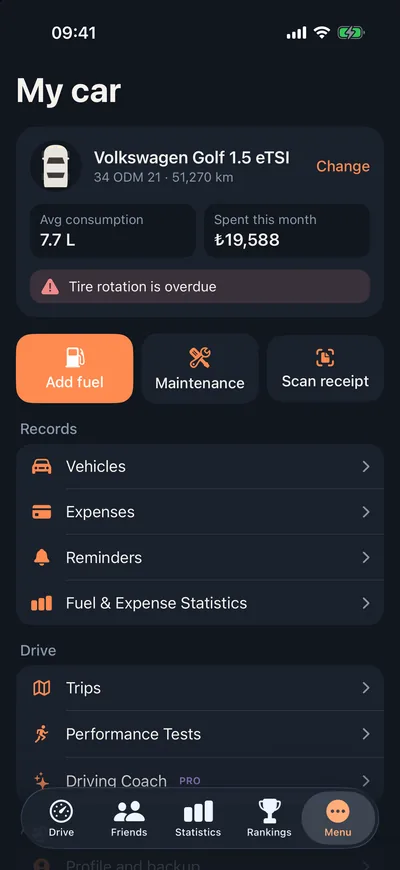
What does your car cost you each month?
Gas receipts in your wallet, the service invoice in your inbox, the insurance policy in a folder. Until they are in one place, there's no way to know what your car really costs.
Odometer records every fill-up, service and expense against the car it belongs to. The garage screen shows your average consumption and this month's total; the statistics screen shows how it breaks down month by month.
How do I log it?
- 01
Tap Add fuel
From the shortcut in your garage, enter the amount, volume and odometer reading. The amount field formats itself as you type.
- 02
Or snap the receipt
With Pro, photograph the receipt; it is read on your device and the amount and volume fill themselves in.
- 03
See your consumption
After a few fill-ups, your average consumption and cost per fill-up appear.
What's in the fuel and expense log?
Average consumption
mpg, L/100 km or km/L, whichever you're used to.
Cost per fill-up
Amount, volume and odometer reading for every fill-up, compared across periods.
Every expense
Service, insurance, parking, washes and more, by category.
Monthly spend
This month's total in the garage, and fuel and expense charts by month in statistics.
Electric cars
Log charging in kWh and consumption is calculated from it.
Receipt scanningPro
The text on the photo is read on your device; the photo itself never leaves it.
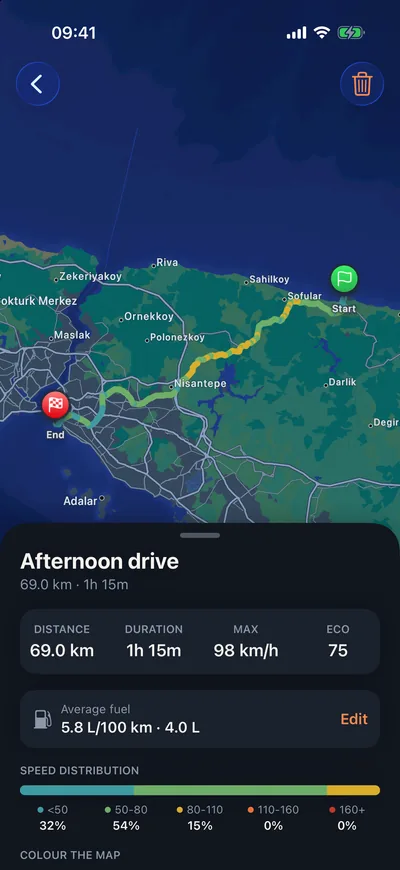
Frequently asked questions
How is average fuel consumption calculated?
When you log fill-ups with the odometer reading, the average is worked out from the distance driven and the fuel bought. The more regularly you log, the more realistic the average.
How does receipt scanning work?
The text on the receipt photo is read on your phone (ML Kit on Android, Apple Vision on iPhone). The text is then sent to an AI model to pick out the amount and category; the photo itself is not sent. Receipt scanning is a Pro feature.
Can I keep costs separate for more than one car?
Yes. Add as many cars as you like to your garage; every record belongs to a car and lists can be filtered by car.
Can I change the currency?
Yes. The currency is chosen from your region automatically, and you can pick any currency in Settings.
See what your car really costs.
Log your first fill-up today; in a few weeks the picture draws itself.